On-Behalf-Of
The Fanoni API supports an "On-Behalf-Of" feature to enable a Customer Server Side App to act on behalf of a Fanoni user.
This feature is designed to enable a common Fanoni architectural pattern where the Customer Server Side App is the only system component that interacts with Fanoni Server.
Overview
Consider this common Fanoni architectural pattern:
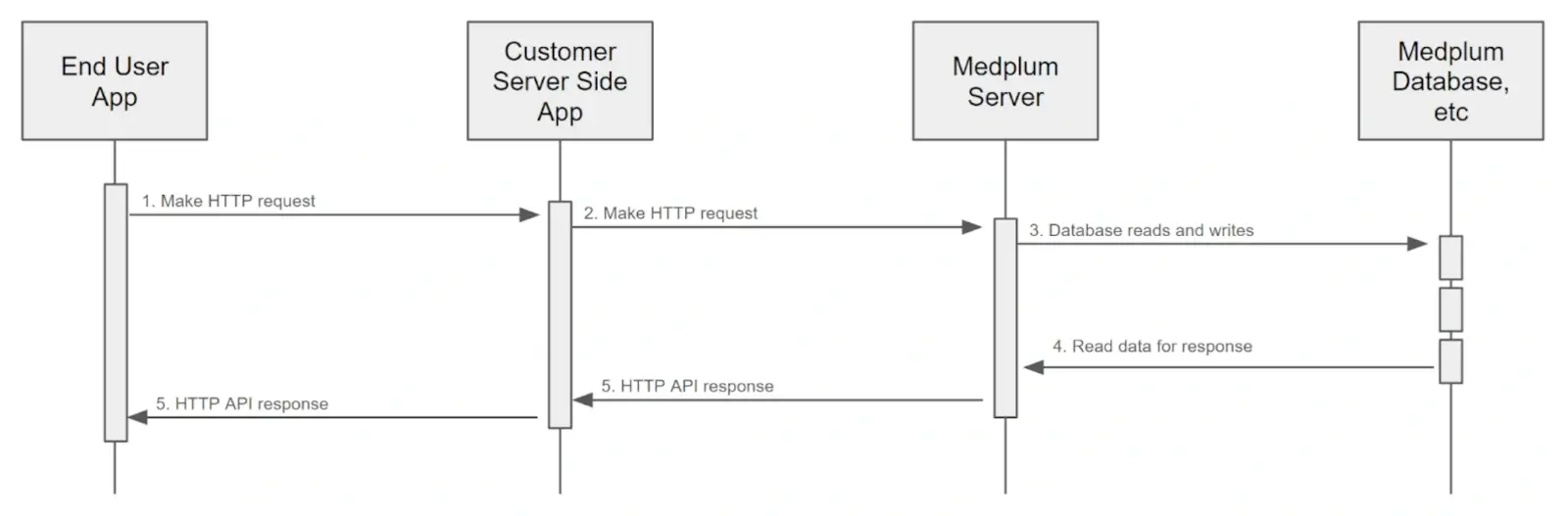
Here, the Fanoni "Customer" has a custom End User App and a Server Side App to enable their business requirements.
In this model, the Customer Server Side App is the only system component that interacts with Fanoni Server. In this model, the Fanoni Server is more like an internal data store.
Historically, it was difficult to use this model and take advantage of many Fanoni features related to Fanoni authentication (author tracking, access policies, etc).
Now, with the "On-Behalf-Of" feature, the Customer Server Side App can act on behalf of a Fanoni user.
How to Use
First, the Customer Server Side App must authenticate with Fanoni Server as a ClientApplication. This is the same as any other Fanoni ClientApplication.
The only requirement for the ClientApplication is that it has Project Admin rights. This is because the ClientApplication will be acting on behalf of a Fanoni ProjectMembership.
Then, when making API requests, the Customer Server Side App must include an X-Medplum-On-Behalf-Of HTTP header. The value of this header can be either:
- A
ProjectMembershipID - This is the most direct and explicit way to specify the Fanoni user. The Customer Server Side App would presumably store this id in its own database. - A profile ID such as
PatientorPractitioner- This is a more natural value for the Customer Server Side App to use, but requires a lookup to find the correspondingProjectMembership.
For more information on ProjectMemberships and profile resources, see the User Management Guide.
The X-Medplum-On-Behalf-Of header is only valid for the current request. It is not stored or persisted in any way.
The X-Medplum-On-Behalf-Of feature is compatible with both JWT access tokens and Basic Authentication.
How it Works
When the Fanoni Server receives a request with the X-Medplum-On-Behalf-Of header, it will:
- Authenticate the
ClientApplicationas normal - Check for the
X-Medplum-On-Behalf-Ofheader - If present, set up the Repository instance accordingly
- Set
onBehalfOfto the specifiedProjectMembershipID - Use the
ProjectMembershipaccess policy
- Set
- Proceed with the request as normal
- Include the
onBehalfOfvalue in themeta.onBehalfOfelement of the response
Example
Here is a curl example of using the X-Medplum-On-Behalf-Of header:
curl 'https://api.medplum.com/fhir/R4/Patient' \
  --user $MY_CLIENT_ID:$MY_CLIENT_SECRET \
  -H 'content-type: application/fhir+json' \
  -H 'x-medplum: extended' \
  -H 'x-medplum-on-behalf-of: ProjectMembership/00000000-001a-4722-afa1-0581d2c52a87' \
  --data-raw '{"resourceType":"Patient","name":[{"given":["Homer"],"family":"Simpson"}]}'
Here is the same example using the Fanoni SDK:
const medplum = new MedplumClient({
  clientId: MY_CLIENT_ID,
  clientSecret: MY_CLIENT_SECRET,
});

await medplum.createResource(
  {
    resourceType: 'Patient',
    name: [{ given: ['Homer'], family: 'Simpson' }],
  },
  {
    headers: {
      'X-Medplum': 'extended',
      'X-Medplum-On-Behalf-Of': 'ProjectMembership/00000000-001a-4722-afa1-0581d2c52a87',
    },
  }
);
If you want to apply the header to all requests, set a default header when constructing the client:
const medplumWithDefaults = new MedplumClient({
  clientId: MY_CLIENT_ID,
  clientSecret: MY_CLIENT_SECRET,
  defaultHeaders: {
    'X-Medplum': 'extended',
    'X-Medplum-On-Behalf-Of': 'ProjectMembership/00000000-001a-4722-afa1-0581d2c52a87',
  },
});
Note the two extra HTTP request headers:
X-Fanoni: extended- This is required to enable the extended Fanoni API features, such asmeta.authorandmeta.onBehalfOf.X-Medplum-On-Behalf-Of- This is theProjectMembershipID that the client is acting on behalf of.
Here is the resulting FHIR JSON:
{
  "resourceType": "Patient",
  "id": "00000000-689b-4e20-a3c2-6f55108b432a",
  "meta": {
    "versionId": "00000000-b58b-47c8-9fc0-f85627d333c9",
    "lastUpdated": "2024-07-13T21:18:45.850Z",
    "author": {
      "reference": "ClientApplication/00000000-d361-46f0-adf4-f56da467dc08",
      "display": "My Client"
    },
    "onBehalfOf": {
      "reference": "Practitioner/00000000-9886-4b83-a25a-3b99563b8127",
      "display": "My Test User"
    }
  },
  "name": [{ "given": ["Homer"], "family": "Simpson" }]
}